有些 JavaScript 函数是纯的。纯函数只执行计算,而不做其他事情。通过严格将组件仅编写为纯函数,你可以避免随着代码库的增长而产生的一整类令人困惑的错误和不可预测的行为。不过,要获得这些好处,你必须遵循一些规则。
🌐 Some JavaScript functions are pure. Pure functions only perform a calculation and nothing more. By strictly only writing your components as pure functions, you can avoid an entire class of baffling bugs and unpredictable behavior as your codebase grows. To get these benefits, though, there are a few rules you must follow.
你将学习到
- 什么是纯粹以及它如何帮助你避免错误
- 如何通过将更改排除在渲染阶段之外来保持组件纯粹
- 如何使用严格模式查找组件中的错误
纯粹:组件作为公式
🌐 Purity: Components as formulas
在计算机科学中(尤其是在函数式编程字段),纯函数 是具有以下特性的函数:
🌐 In computer science (and especially the world of functional programming), a pure function is a function with the following characteristics:
- 它只管自己的事。 它不会改变在被调用之前存在的任何对象或变量。
- 相同的输入,相同的输出。 给定相同的输入,纯函数应该总是返回相同的结果。
你可能已经熟悉一个纯函数的例子:数学中的公式。
🌐 You might already be familiar with one example of pure functions: formulas in math.
考虑这个数学公式: y = 2x。
如果 x = 2 那么 y = 4。总是如此。
如果 x = 3 那么 y = 6。总是如此。
如果 x = 3,y 有时不会是 9 或 –1 或 2.5 取决于一天中的时间或股票市场的状态。
如果 y = 2x 并且 x = 3, y 将_总是_为 6。
如果我们把它做成一个 JavaScript 函数,它看起来像这样:
🌐 If we made this into a JavaScript function, it would look like this:
function double(number) {
  return 2 * number;
}在上面的例子中,double 是一个纯函数。 如果你传递给它 3,它将返回 6。总是这样。
🌐 In the above example, double is a pure function. If you pass it 3, it will return 6. Always.
React 是围绕这个概念设计的。React 假设你编写的每个组件都是纯函数。 这意味着你编写的 React 组件在给定相同输入时必须始终返回相同的 JSX:
🌐 React is designed around this concept. React assumes that every component you write is a pure function. This means that React components you write must always return the same JSX given the same inputs:
function Recipe({ drinkers }) {
  return (
    <ol>
      <li>Boil {drinkers} cups of water.</li>
      <li>Add {drinkers} spoons of tea and {0.5 * drinkers} spoons of spice.</li>
      <li>Add {0.5 * drinkers} cups of milk to boil and sugar to taste.</li>
    </ol>
  );
}

export default function App() {
  return (
    <section>
      <h1>Spiced Chai Recipe</h1>
      <h2>For two</h2>
      <Recipe drinkers={2} />
      <h2>For a gathering</h2>
      <Recipe drinkers={4} />
    </section>
  );
}
当你将 drinkers={2} 传递给 Recipe 时,它将始终返回包含 2 cups of water 的 JSX。
🌐 When you pass drinkers={2} to Recipe, it will return JSX containing 2 cups of water. Always.
如果你传入 drinkers={4},它将返回包含 4 cups of water 的 JSX。始终如此。
🌐 If you pass drinkers={4}, it will return JSX containing 4 cups of water. Always.
就像一个数学公式。
🌐 Just like a math formula.
你可以将你的组件看作秘诀:如果你按照它们操作,并且在烹饪过程中不加入新的食材,你每次都会得到相同的菜品。这个“菜品”就是组件提供给 React 的 JSX 用于渲染。
🌐 You could think of your components as recipes: if you follow them and don’t introduce new ingredients during the cooking process, you will get the same dish every time. That “dish” is the JSX that the component serves to React to render.
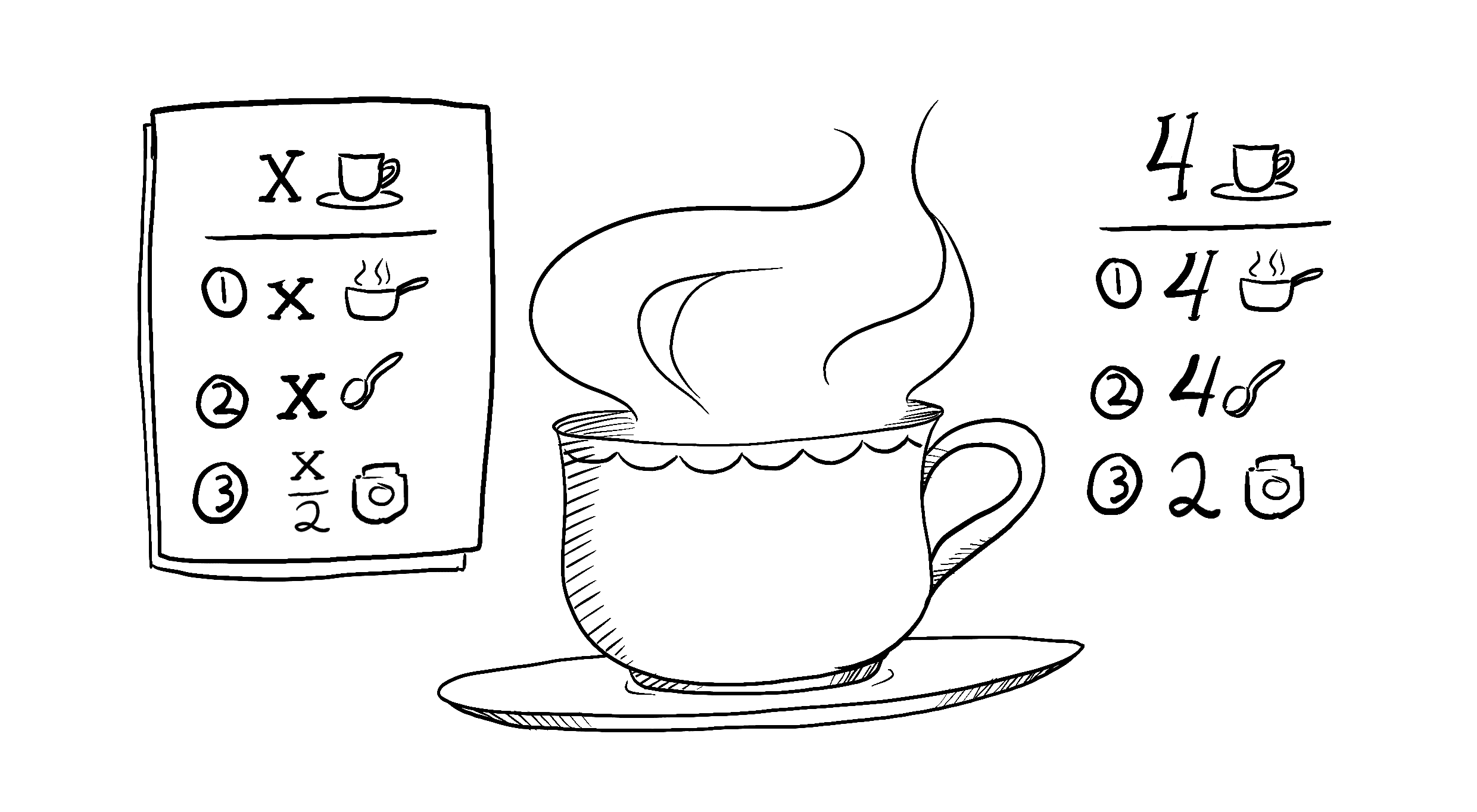
Illustrated by Rachel Lee Nabors
副作用:(非)预期的后果
🌐 Side Effects: (un)intended consequences
React 的渲染过程必须始终是纯粹的。组件应该只 返回 它们的 JSX,而不 改变 渲染前存在的任何对象或变量——那会使它们不纯粹!
🌐 React’s rendering process must always be pure. Components should only return their JSX, and not change any objects or variables that existed before rendering—that would make them impure!
这是一个打破这条规则的组件:
🌐 Here is a component that breaks this rule:
let guest = 0;

function Cup() {
  // Bad: changing a preexisting variable!
  guest = guest + 1;
  return <h2>Tea cup for guest #{guest}</h2>;
}

export default function TeaSet() {
  return (
    <>
      <Cup />
      <Cup />
      <Cup />
    </>
  );
}
这个组件正在读取和写入在组件外部声明的 guest 变量。这意味着 多次调用这个组件会产生不同的 JSX! 更重要的是,如果 其他 组件读取 guest,它们也会产生不同的 JSX,取决于它们何时被渲染!这是不可预测的。
🌐 This component is reading and writing a guest variable declared outside of it. This means that calling this component multiple times will produce different JSX! And what’s more, if other components read guest, they will produce different JSX, too, depending on when they were rendered! That’s not predictable.
回到我们的公式 y = 2x,即使 x = 2,我们也不能相信 y = 4。我们的测试可能会失败,用户会困惑,飞机可能会从天空掉下来——你可以看到这会导致多么混乱的错误!
你可以通过传递 guest 作为 prop 来修复这个组件:
🌐 You can fix this component by passing guest as a prop instead:
function Cup({ guest }) {
  return <h2>Tea cup for guest #{guest}</h2>;
}

export default function TeaSet() {
  return (
    <>
      <Cup guest={1} />
      <Cup guest={2} />
      <Cup guest={3} />
    </>
  );
}
现在你的组件是纯粹的,因为它返回的 JSX 仅依赖于 guest 属性。
🌐 Now your component is pure, as the JSX it returns only depends on the guest prop.
一般来说,你不应该期望你的组件以任何特定顺序渲染。无论你是在 y = 2x 之前还是之后 y = 5x 调用,它们的公式都会独立解决。同样,每个组件应该只“自己思考”,在渲染过程中不应试图与其他组件协调或依赖它们。渲染就像学校考试:每个组件都应该自己计算 JSX!
深入研究
🌐 Detecting impure calculations with StrictMode
虽然你可能还没有全部使用它们,但在 React 中有三种在渲染时可以读取的输入:props、state 和 context。你应该始终将这些输入视为只读。
🌐 Although you might not have used them all yet, in React there are three kinds of inputs that you can read while rendering: props, state, and context. You should always treat these inputs as read-only.
当你想根据用户输入更改某些内容时,你应该设置状态,而不是写入变量。你在组件渲染时绝不应该更改已有的变量或对象。
🌐 When you want to change something in response to user input, you should set state instead of writing to a variable. You should never change preexisting variables or objects while your component is rendering.
React 提供了一个“严格模式”,在开发过程中会调用每个组件的函数两次。通过调用组件函数两次,严格模式有助于发现违反这些规则的组件。
🌐 React offers a “Strict Mode” in which it calls each component’s function twice during development. By calling the component functions twice, Strict Mode helps find components that break these rules.
注意原始示例显示的是“Guest #2”、“Guest #4”和“Guest #6”,而不是“Guest #1”、“Guest #2”和“Guest #3”。原始函数是非纯的,所以调用两次会出错。但是修复后的纯函数版本即使每次调用两次也能正常工作。纯函数只进行计算,因此调用两次不会改变任何东西——就像调用 double(2) 两次不会改变返回的内容一样,解 y = 2x 两次也不会改变 y 的值。同样的输入,同样的输出。永远如此。
严格模式在生产环境中没有效果,因此不会减慢用户的应用。要选择启用严格模式,你可以将根组件封装在 <React.StrictMode> 中。一些框架默认会这样做。
🌐 Strict Mode has no effect in production, so it won’t slow down the app for your users. To opt into Strict Mode, you can wrap your root component into <React.StrictMode>. Some frameworks do this by default.
局部修改:你的组件小秘密
🌐 Local mutation: Your component’s little secret
在上面的例子中,问题是组件在渲染时更改了一个已有的变量。这通常被称为**“突变”**,听起来更可怕一些。纯函数不会改变函数作用域之外的变量,也不会改变调用前创建的对象——那会使它们不纯!
🌐 In the above example, the problem was that the component changed a preexisting variable while rendering. This is often called a “mutation” to make it sound a bit scarier. Pure functions don’t mutate variables outside of the function’s scope or objects that were created before the call—that makes them impure!
然而,在渲染时更改你刚刚创建的变量和对象是完全可以的。 在这个例子中,你创建了一个 [] 数组,将它分配给一个 cups 变量,然后向其中 push 一打杯子:
🌐 However, it’s completely fine to change variables and objects that you’ve just created while rendering. In this example, you create an [] array, assign it to a cups variable, and then push a dozen cups into it:
function Cup({ guest }) {
  return <h2>Tea cup for guest #{guest}</h2>;
}

export default function TeaGathering() {
  const cups = [];
  for (let i = 1; i <= 12; i++) {
    cups.push(<Cup key={i} guest={i} />);
  }
  return cups;
}
如果 cups 变量或 [] 数组是在 TeaGathering 函数外部创建的,这将是一个大问题!你会通过向该数组中添加项目来改变一个已有的对象。
🌐 If the cups variable or the [] array were created outside the TeaGathering function, this would be a huge problem! You would be changing a preexisting object by pushing items into that array.
不过没关系,因为你是在 TeaGathering 内的同一次渲染期间创建的它们。TeaGathering 之外的任何代码都永远不会知道这件事。这被称为**“局部变更”**——就像是你组件的小秘密。
🌐 However, it’s fine because you’ve created them during the same render, inside TeaGathering. No code outside of TeaGathering will ever know that this happened. This is called “local mutation”—it’s like your component’s little secret.
你可以引起副作用的地方
🌐 Where you can cause side effects
虽然函数式编程在很大程度上依赖于纯粹性,但在某个时候、某个地方,总有一些东西必须改变。这正是编程的意义!这些变化——更新屏幕、启动动画、改变数据——被称为副作用。它们是在渲染过程中“不在主要流程中”发生的事情。
🌐 While functional programming relies heavily on purity, at some point, somewhere, something has to change. That’s kind of the point of programming! These changes—updating the screen, starting an animation, changing the data—are called side effects. They’re things that happen “on the side”, not during rendering.
在 React 中,副作用通常属于 事件处理程序 内。 事件处理程序是当你执行某些操作时 React 运行的函数——例如,当你点击按钮时。即使事件处理程序是在你的组件内部定义的,它们也不会在渲染期间运行!所以事件处理程序不需要是纯函数。
🌐 In React, side effects usually belong inside event handlers. Event handlers are functions that React runs when you perform some action—for example, when you click a button. Even though event handlers are defined inside your component, they don’t run during rendering! So event handlers don’t need to be pure.
如果你已经用尽了所有其他选项,仍然找不到适合你的副作用的事件处理程序,你仍然可以在组件中通过 useEffect 调用将它附加到返回的 JSX 上。这会告诉 React 在渲染完成后执行它,此时允许副作用发生。然而,这种方法应作为最后的手段。
🌐 If you’ve exhausted all other options and can’t find the right event handler for your side effect, you can still attach it to your returned JSX with a useEffect call in your component. This tells React to execute it later, after rendering, when side effects are allowed. However, this approach should be your last resort.
在可能的情况下,尽量只用渲染来表达你的逻辑。你会惊讶于这能带你走多远!
🌐 When possible, try to express your logic with rendering alone. You’ll be surprised how far this can take you!
深入研究
🌐 Why does React care about purity?
编写纯函数需要一些习惯和纪律。但它也开启了奇妙的机会:
🌐 Writing pure functions takes some habit and discipline. But it also unlocks marvelous opportunities:
- 你的组件可以在不同的环境中运行——例如,在服务器上!由于它们对相同的输入返回相同的结果,一个组件可以服务于许多用户请求。
- 你可以通过跳过渲染输入未更改的组件来提高性能。这是安全的,因为纯函数总是返回相同的结果,所以缓存它们是安全的。
- 如果在渲染深层组件树的过程中某些数据发生变化,React 可以重新开始渲染,而不必浪费时间完成过时的渲染。纯粹性使得在任何时候停止计算都是安全的。
我们正在构建的每一个新的 React 功能都利用了纯性。从数据获取到动画再到性能,保持组件的纯粹性可以释放 React 范式的力量。
🌐 Every new React feature we’re building takes advantage of purity. From data fetching to animations to performance, keeping components pure unlocks the power of the React paradigm.
回顾
- 组件必须是纯粹的,这意味着:
- 它管好自己的事。 它不应改变渲染前存在的任何对象或变量。
- 相同的输入,相同的输出。 给定相同的输入,组件应始终返回相同的 JSX。
- 渲染可以随时发生,因此组件不应依赖于彼此的渲染顺序。
- 你不应该改变组件用来渲染的任何输入。这包括 props、state 和 context。要更新屏幕,应当设置 state,而不是改变已有的对象。
- 努力在你返回的 JSX 中表达组件的逻辑。当你需要“更改某些内容”时,通常你会希望在事件处理程序中进行。作为最后手段,你可以
useEffect。 - 编写纯函数需要一些练习,但它释放了 React 范例的力量。
挑战 1 of 3: 修复损坏的时钟
🌐 Fix a broken clock
该组件尝试在从午夜到早上六点的时间内将 <h1> 的 CSS 类设置为 "night",而在其他时间将其设置为 "day"。然而,它不起作用。你能修复这个组件吗?
🌐 This component tries to set the <h1>’s CSS class to "night" during the time from midnight to six hours in the morning, and "day" at all other times. However, it doesn’t work. Can you fix this component?
你可以通过暂时更改计算机的时区来验证你的解决方案是否有效。当当前时间在凌晨到早上六点之间时,时钟的颜色应该会反转!
🌐 You can verify whether your solution works by temporarily changing the computer’s timezone. When the current time is between midnight and six in the morning, the clock should have inverted colors!
export default function Clock({ time }) {
  const hours = time.getHours();
  if (hours >= 0 && hours <= 6) {
    document.getElementById('time').className = 'night';
  } else {
    document.getElementById('time').className = 'day';
  }
  return (
    <h1 id="time">
      {time.toLocaleTimeString()}
    </h1>
  );
}